LYNKED Mesh RF Repeater (CN-40)
TECHNICAL MANUAL
Published August 10, 2026 • Last updated August 13, 2026 (v1.0)
1. Safety Information
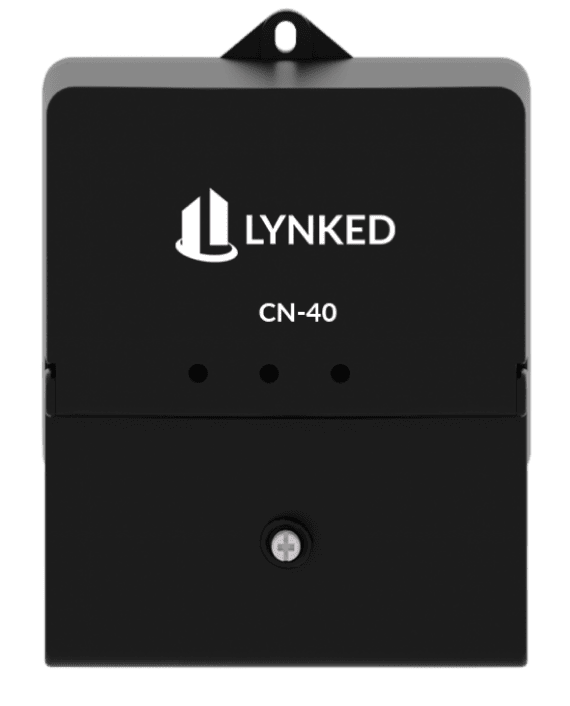
2. Product Overview
2.1 Front-Access Cover
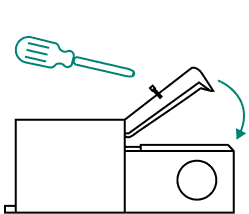
Open the front-access cover to expose the I/O connections.
2.2 Connector & Port Descriptions
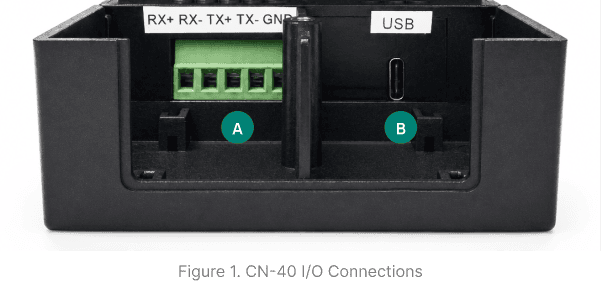
Refer to Figure 1 to locate and identify the ports described below.
The 5-pin connector provides no functionality for the CN-40. This connector is reserved for the LYNKED Mesh RF Wireless Node (CN-41).
5 VDC power input
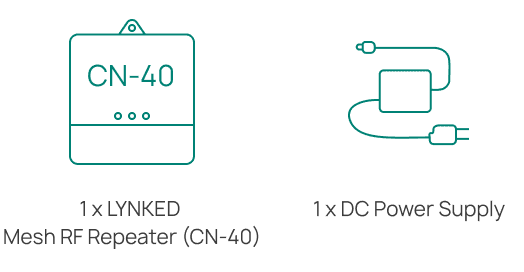
2.3 What's in the Box
3. Installation
Open the box and verify that all items listed in Section 2.3 are present. If any items are missing or damaged, contact LYNKED Support immediately.
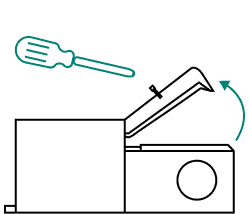
In preparation for installation and wiring, loosen the screw on the CN-40 front-access cover, then tilt the cover back to expose the I/O connections.
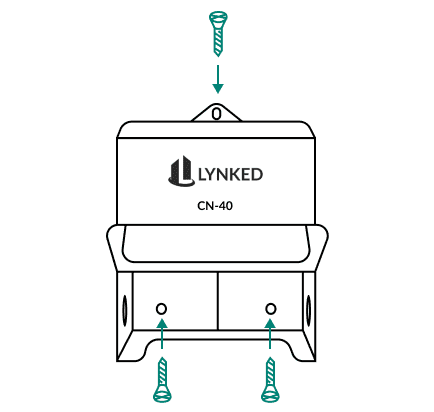
Choose a location that can withstand the specified operating temperature (see CN-40 Technical Specifications). Allow adequate clearance for ventilation and cable routing. Install the CN-40 in a safe location, such as a locked electrical, mechanical, or communications room or closet. Avoid unsecured areas such as hallways, stairwells, or shared amenity spaces.
For Outdoor Installations: Outdoor installation of the CN-40 is not recommended for general use. However, it may be performed in specific cases where the gateway is appropriately protected. If installed outdoors, use a NEMA-rated enclosure suitable for the local climate and environmental conditions. For information on NEMA enclosure ratings, refer to the NEMA Rating Guide.
If mounting the CN-40 is required for your installation, secure it to a suitable mounting surface using three appropriate screws depending on the surface material.
Route the power supply connector through the side cutout hole, then connect it to the CN-40.
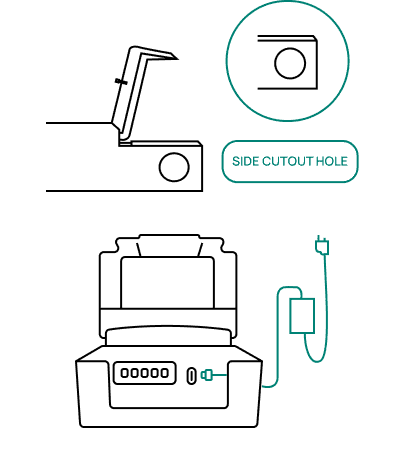
Ensure all wiring is securely connected before closing the cover to avoid having to unscrew and reopen it. Close the cover and tighten the top screw.
Ensure that the CG-400 used with the CN-40 has powered on and booted. To allow the CN-40 to communicate on the Mesh RF network, add it to the list of authorized devices within the CG-400 user interface. If automatic device addition is enabled, the CG-400 will add the CN-40's MAC address to the list. Find the MAC address on the CN-40's label. If required, manually add this MAC address to the authorized device list.
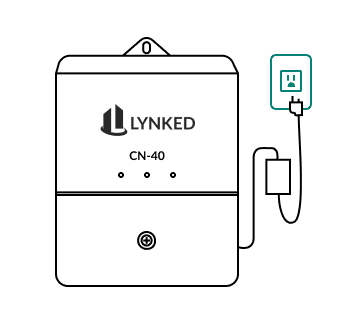
Ensure the power supply is plugged into a 120 VAC outlet. The CN-40 will power on and the LEDs will light up. The CN-40 will attempt to connect to the Mesh RF network. The initial connection time can take ~15 minutes.
See Section 5 for LED indicator reference and Section 6 for basic troubleshooting.
4. Wireless Communication Overview
Mesh Topology
Nodes, repeaters, or end devices on the network can communicate directly to the CG-400. Data can also be relayed through these intermediary devices to get to the gateway.
Self-Healing
If a node, repeater, or end device drops out of the network, traffic will be automatically rerouted using the neighboring Mesh RF devices as a communication path instead.
Coverage via Mesh RF
LYNKED Mesh RF achieves extended coverage over large areas through its mesh network topology. Each device functions as a repeater, so range is extended as devices retransmit signals to one another rather than requiring a single device to reach the destination directly. This allows coverage to scale with the number of devices in the mesh, rather than being limited to the range of an individual RF device.
5. LED Indicators
Power Indicator
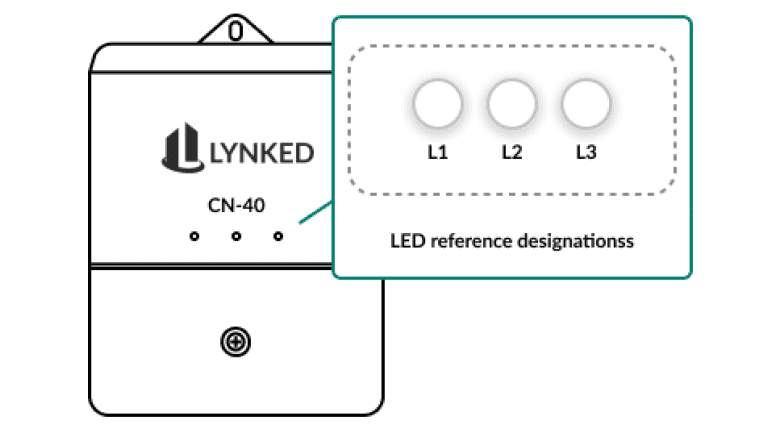
1st LED (L1)
Red (solid)
Device is powered on and working normally
Mesh RF TX/RX Activity Indicator
2nd LED (L2)
Red (blink)
Green (blink)
Alternating sequence
Device is attempting to connect to the network
OFF (after alternating sequence)
Device is connected. LED stays off unless there is TX/RX activity
Mesh RF Indicator
3rd LED (L3)
Green (blink)
Device is attempting to connect to the network
OFF (after blinking)
Device is connected to the network
6. Basic Troubleshooting
Power LED is OFF
Confirm power supply is securely plugged into CN-40 and outlet.
Confirm the outlet is live or connect to a known-working outlet.
Inspect power supply for damage.
No Mesh RF Activity
Mesh RF connections can take over 15 minutes to establish (scanning, authentication, routing). Wait at least 15 minutes before troubleshooting further.
Confirm that the CN-40 and other LYNKED devices on the network are powered on.
If distance is degrading the signal, add a repeater device, such as the LYNKED CN-40, CN-41, or CM-MRFA.
Check for metal or thick concrete (especially rebar) blocking the signal path. Relocate the device or antenna to avoid the obstruction.
Confirm that the CN-40's MAC address is on the CG-400's authorized device list.
NEED HELP? Contact help@lynked.io or create a ticket here.
7. Regulatory Information
7.1 Compliance
EMC: CAN ICES-003(B) / NMB-003(B), FCC Part 15B Class B
Safety: CSA C22.2 No. 62368-1, UL 62368-1
Radio Frequency (RF): RSS-Gen, RSS-102, RSS-247, FCC Part 2 (§2.1091), 15C (§15.247)
7.2 Certifications
Contains IC: 8979A-WSN27915
Contains FCC ID: UU3FC-3902-915
MET Listed:

7.3 ISED Compliance Statements
CAN ICES-003(B)
This device contains licence-exempt transmitter(s)/receiver(s) that comply with Innovation, Science and Economic Development Canada's licence-exempt RSS(s). Operation is subject to the following two conditions: (1) This device may not cause interference, and (2) this device must accept any interference, including interference that may cause undesired operation of the device.
This equipment complies with ISED radiation exposure limits for an uncontrolled environment. This equipment should be installed and operated with a minimum distance of 20 cm (8 inches) between the radiator and the user's body.
CAN NMB-003(B)
Cet appareil contient un ou plusieurs émetteurs/récepteurs sans licence conformes aux normes RSS exemptes de licence d'Innovation, Sciences et Développement économique Canada. Son fonctionnement est soumis aux deux conditions suivantes : (1) Cet appareil ne doit pas causer d'interférences, et (2) cet appareil doit accepter toute interférence, y compris les interférences pouvant entraîner un fonctionnement indésirable.
Cet appareil est conforme aux limites d'exposition aux rayonnements d'ISED pour un environnement non contrôlé. Il doit être installé et utilisé à une distance minimale de 20 cm (8 pouces) entre l'émetteur et le corps de l'utilisateur.
7.4 UL & CSA Compliance Statements
This product is designed and manufactured to meet the safety requirements of UL 62368-1 and CSA C22.2 No. 62368-1 for Audio/Video, Information and Communication Technology Equipment. Use only the provided power supply and do not operate this equipment near water. This equipment is intended for indoor use only. Follow all instructions in this manual to ensure safe operation.
Ce produit est conçu et fabriqué conformément aux exigences de sécurité des normes UL 62368-1 et CSA C22.2 No. 62368-1 pour les équipements audio/vidéo, les équipements de technologie de l'information et de communication. Utilisez uniquement l'alimentation fournie et ne faites pas fonctionner cet équipement à proximité de l'eau. Cet équipement est destiné uniquement à un usage intérieur. Suivez toutes les instructions de ce manuel pour assurer une utilisation en toute sécurité.
7.5 FCC Compliance Statements
This device complies with part 15 of the FCC Rules. Operation is subject to the following two conditions: (1) This device may not cause harmful interference, and (2) this device must accept any interference received, including interference that may cause undesired operation.
Note: This equipment has been tested and found to comply with the limits for a Class B digital device, pursuant to part 15 of the FCC Rules. These limits are designed to provide reasonable protection against harmful interference in a residential installation. This equipment generates, uses and can radiate radio frequency energy and, if not installed and used in accordance with the instructions, may cause harmful interference to radio communications. However, there is no guarantee that interference will not occur in a particular installation. If this equipment does cause harmful interference to radio or television reception, which can be determined by turning the equipment off and on, the user is encouraged to try to correct the interference by one or more of the following measures:
Reorient or relocate the receiving antenna.
Increase the separation between the equipment and receiver.
Connect the equipment into an outlet on a circuit different from that to which the receiver is connected.
Consult the dealer or an experienced radio/TV technician for help.
Changes or modifications not expressly approved by LYNKED Inc. could void the user's authority to operate this equipment.
This device contains transmitter module FCC ID: UU3FC-3902-915.
This equipment complies with FCC radiation exposure limits for an uncontrolled environment. This equipment should be installed and operated with a minimum distance of 20 cm (8 inches) between the radiator and the user's body.
7.6 Tampering Prohibited
Unauthorized tampering, modification, or alteration of this device is strictly prohibited. Any such actions may compromise the performance, safety, or regulatory compliance of the device and may void applicable warranties, service agreements, and the user's authority to operate the equipment.
Looking for other gateways or communication devices?